
MailerLite Review
A Guide to Simple Email Marketing for Side Hustlers
You close your work laptop, grab a snack, then open the “real” laptop.
Now it is side-hustle time.
If you are blogging at night, selling templates on weekends, or lining up freelance clients between family tasks, you do not have time for messy tools. You need something that quietly works while you sleep.
Email is still one of the highest ROI channels in 2025. Social feeds shift, algorithms swing, but your email list is yours. A tool like MailerLite helps you look polished, grow a loyal audience, and sell without a huge budget or tech headache.
This MailerLite review is written for bloggers, creators, and early founders who want to grow a list, sell simple digital products, or promote services while keeping costs low and stress levels sane. You will get a clear, no-fluff look at MailerLite’s features, pricing, pros, cons, and best use cases so you can decide if it fits your side hustle.
Disclosure: our content is reader-supported, which means we may earn commissions from links at no cost to you.
What MailerLite does and Who it is For
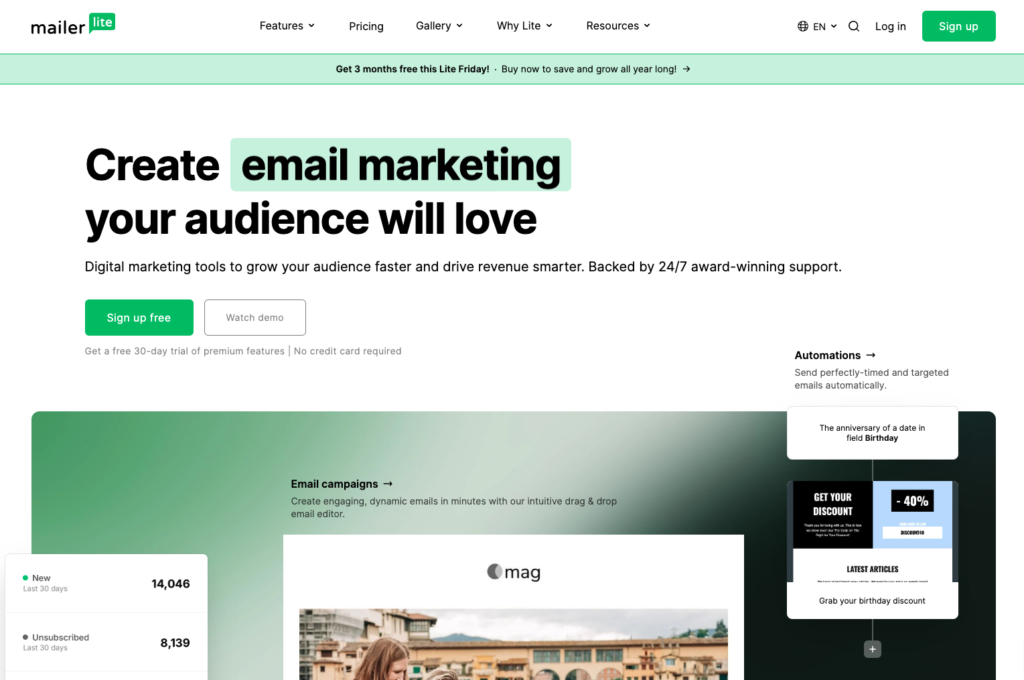
MailerLite is an email marketing and basic marketing automation platform. It focuses on clean design, simple setup, and fair pricing. If some email tools feel like flying a plane, MailerLite feels more like driving a small car.
You can use it to collect subscribers, send newsletters, and set up simple automation flows. The interface is tidy, with menus that make sense even if you have never used email software before. It feels friendly rather than corporate.
MailerLite is popular with:
- Bloggers and newsletter writers
- Creators on YouTube, TikTok, and Instagram
- Freelancers and coaches
- Tiny SaaS and indie product founders
It fits best if you:
- Run a side hustle or one-person business
- Want to launch fast, without a complex stack
- Care more about clean, reliable basics than fancy tricks
- Need something that scales from “first 50 subscribers” to a few thousand
MailerLite works well for weekly newsletters, lead magnets, basic funnels, and small digital product sales. You can spin up landing pages, deliver a free guide, and send a short welcome series without touching code.
If you want your email tool to feel like a calm workspace instead of a puzzle, MailerLite is built with you in mind.
Key things MailerLite helps you do
Here are the main jobs MailerLite can handle for a side hustle:
- Collect subscribers: Create signup forms and popups for your blog, portfolio, or link-in-bio page.
- Send newsletters: Write and send regular updates, tips, or product news to your list.
- Set up welcome emails and simple automations: Send a series of emails when someone joins, grabs a freebie, or clicks a key link.
- Segment your list: Group people based on interests, actions, or purchase history so emails feel more personal.
- Build landing pages and simple websites: Launch a one-page site or lead-magnet page without a separate builder.
- Run basic paid newsletters or digital products: In many regions, sell ebooks, templates, or premium email access with built-in checkout.
- Track performance: See opens, clicks, and sales so you know which emails and offers work.
If you picture your side hustle as a small shop, MailerLite is the counter, the sign on the door, and the cash drawer in one simple tool.
Who should skip MailerLite and look for something else?
MailerLite is not for everyone. Some people will hit its limits and feel blocked.
You may want a different tool if:
- You run a large e‑commerce brand: You need deep product-based automation, cart tracking, and tight store integration that tools like Klaviyo handle better.
- You manage complex sales teams: You need full CRM features, pipelines, and sales dashboards, which sit beyond MailerLite’s scope.
- You want an all-in-one course and community platform: Tools like Kajabi or Circle combine email with courses, communities, and advanced checkout flows.
- You plan huge, complex funnels: If you live on split tests, multi-branch logic, and heavy personalization, you will likely prefer a higher-end automation tool.
If your current reality is a side project, a small list, and an offer you are still shaping, MailerLite is usually enough. If you are already running a multi-team machine, you will want something heavier.
MailerLite Features
How It Actually Works for Side Hustlers
Tools sound similar on a sales page. What matters is how they feel on a tired Tuesday night.
Here is how MailerLite works week to week when you use it to grow a blog, sell a Notion template, or book freelance clients.
Email editor and templates
MailerLite gives you a drag-and-drop email builder and a plain text editor.
The drag-and-drop builder lets you stack blocks like images, buttons, text, and product highlights. You can rearrange sections, change colors, and add simple layouts without touching code. It is easy to add a “Buy now” button for a new PDF or a “Listen here” button for your podcast.
There are starter templates for newsletters, promotions, and announcements. They look clean and modern, not flashy. For many side hustlers, that is perfect; your words and offers stand out.
Pros:
- Simple, visual editor that is fast to learn
- Clean default designs that look professional on mobile
- Plain text option for “letter-style” emails that feel personal
Cons:
- Fewer fancy designs than some rivals
- You may want to tweak fonts and spacing so your brand feels unique
In practice, you can sit down on a Sunday night, pick a template, drop in your blog post highlights and a soft pitch for your latest product, then hit send in under half an hour once you know the tool.
Automation and sequences
Set it up once, keep earning
MailerLite’s automation builder uses triggers, delays, and conditions.
- A trigger is what starts the flow, like “subscriber joined list” or “filled out this form.”
- A delay adds a wait time between emails, like 1 day or 3 days.
- A condition checks something, like “did they click this link” or “are they in this group.”
A blogger can offer a free guide, then send a 4-part welcome series:
- Day 0: Deliver the guide and set expectations.
- Day 2: Share your best content and quick wins.
- Day 4: Tell your story and why you created the guide.
- Day 6: Soft pitch your ebook, template, or coaching call.
A designer can let people download a small portfolio, then send work samples and a booking link. A tutor can sell a 4-week program with a short launch sequence that opens, reminds, and closes doors.
MailerLite handles these use cases well. You can build clear paths that welcome, warm up, and pitch.
Where it feels limited:
- Complex funnels with many branches can get hard to manage
- Trigger options and behavior data are not as deep as tools built for large marketing teams
For most side hustles, simple flows are enough. You want something that works, not a puzzle.
Landing pages and websites
Capture leads without a full website
If you do not have a website yet, MailerLite lets you start anyway.
You get a basic website builder and landing page builder. You choose a template, add your copy and images, then publish to a MailerLite domain or your own custom domain.
You can build:
- A lead magnet page for your free checklist or Notion template
- A waitlist page for an upcoming course or service
- A one-page site with an about section, social links, and email form
Blocks include text, images, testimonials, pricing tables, and signup forms. Every form can connect to an email list, automation, or group in your account.
Strengths:
- No-code, friendly editor
- Fast to launch a simple page in one evening
- Direct connection between forms and email flows
Limits:
- Not built for large blogs or content-heavy sites
- Design options are simpler than full website builders
If your goal is “start growing a list this week,” these pages do the job.
Selling digital products and paid newsletters inside MailerLite
MailerLite lets you sell digital products and paid newsletters in many regions. You can set up simple offers such as:
- Ebooks and workbooks
- Notion or Airtable templates
- Lightroom presets
- Access to a premium weekly email
You add product details, price, and delivery file or email access. MailerLite then gives you a checkout page that connects directly to your email list. Buyers can be tagged as customers, dropped into a post-purchase sequence, and invited to related offers.
You will still pay payment processor fees through tools like Stripe. MailerLite may also charge a small fee on each sale depending on plan and region, so it is smart to check current details on the pricing page.
Compared to a stack like Gumroad plus a separate email tool, MailerLite’s built-in option keeps more of the flow in one place. For complex shops with many products, you may still want a dedicated cart, but for a small digital catalog, it feels light and tidy.
List management, tags, and segments
Keep your audience organized
MailerLite organizes people with:
- Subscribers: Every person on your list
- Groups or tags: Labels for interests or actions
- Segments: Smart lists based on rules, like “clicked last 3 emails”
A side hustler might:
- Tag buyers of a certain product
- Track which lead magnet someone came from
- Create a segment of “warm leads” who opened the last 5 emails
- Keep a group of past clients for check-in offers
Good list hygiene, like removing cold subscribers and avoiding duplicates, helps you save money and keep deliverability strong. MailerLite gives you simple tools to clean your list and avoid sending unwanted emails.
You do not need to be a data nerd. Start with a few tags such as “lead magnet name,” “customer,” and “VIP reader,” and grow from there.
MailerLite Pricing
Money matters when your project is still paying for its own tools.
MailerLite’s pricing is built around subscriber count, with a free plan for small lists and paid plans as you grow. It sits on the more affordable side of the email market, especially compared to creator-focused tools that charge higher rates for similar list sizes.
MailerLite pricing
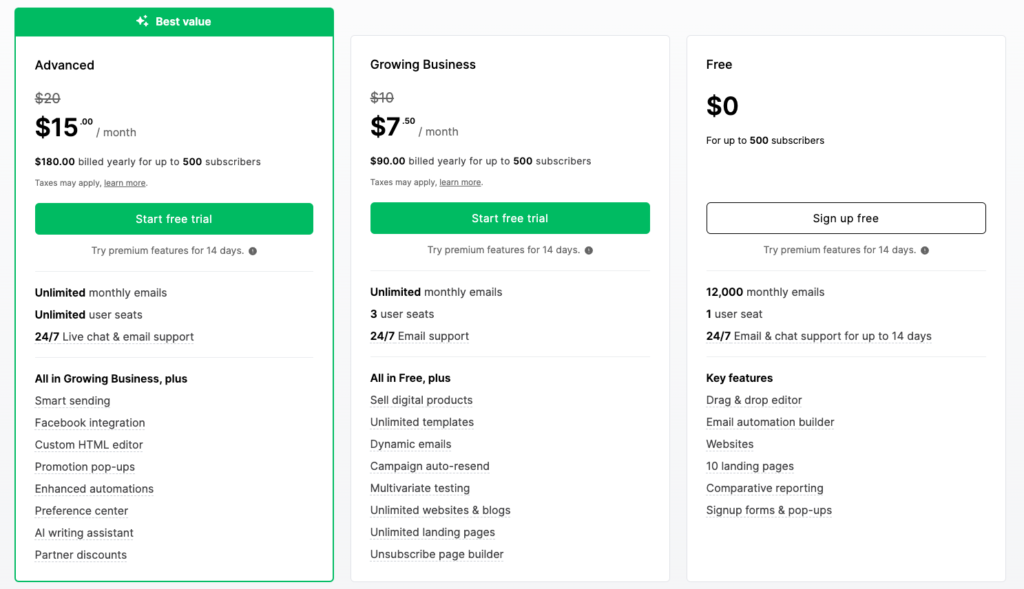
At the time of writing, MailerLite usually offers:
- Free plan: For small lists, often around 1,000 subscribers, with a cap on monthly emails. You get core features like campaigns, basic automation, and landing pages.
- Lower paid tier (starter level): For growing lists that moved past the free cap. Adds higher sending limits, more automation options, and better support.
- Mid and higher tiers (growing and serious growth): For larger lists and teams. These bring in features such as advanced automations, more sites, extra users, and higher priority support.
Prices rise with subscriber count, which is standard in email marketing. Compared with tools like ConvertKit or Beehiiv, MailerLite often comes in cheaper for the same size list, especially in the early stages. Mailchimp may look cheap at first but can climb faster as features and contacts increase.
Always check the live pricing page before you decide. Plan names, limits, and fees can change over time.
Pros for side hustlers
Easy to learn
You can figure out the basics in an evening, even if you are new to email tools. That means more time writing and selling, less time stuck watching tutorials.
Clean interface
Menus are simple and screens are not cluttered. When you sit down after a workday, you will not feel lost.
Strong free and low-cost options
The free plan and lower tiers give you enough power to run a real side hustle. You can test ideas and build proof before paying more.
Solid automation for the price
Welcome series, launch sequences, simple funnels, all without a complex builder. Great for blogs, small products, and services.
Built-in landing pages and sites
You can start growing a list even before you pay for a full site or hire a designer.
Simple digital product sales
Selling a small set of products or a paid newsletter from the same tool keeps your stack lean.
Good deliverability for most users
With clean lists and normal sending habits, your emails have a strong chance of landing in inboxes instead of spam.
Cons you should know
Stricter approval for new accounts
MailerLite reviews new senders to cut spam. If your site looks thin or your list source is unclear, approval can take time. This can slow you down at the start.
Fewer deep e‑commerce features
If you run a heavy online store with hundreds of SKUs, you will likely miss product-level triggers and advanced retail data.
Template library is not very flashy
Templates look clean but not bold or trendy. You may want to customize designs more to match a strong brand.
Complex automations have a learning curve
Simple flows are easy, but large branching funnels can feel clunky. If you crave high-level logic, you may want a more advanced tool later.
Support can feel slow at busy times
Email support is usually helpful but may not be instant, especially on lower tiers.
For many side hustlers, these tradeoffs are mild. The tool stays out of your way, which is what you need on limited time.
Is MailerLite Right For Your Side Hustle?
Real Use-Case Scenarios
Tools are easier to judge when you see them in real stories. Picture yourself in one of these.
Bloggers and content creators building an email list
You publish blog posts or videos when your schedule allows. You do not always stick to a perfect rhythm.
MailerLite can:
- Collect emails with forms on your blog or YouTube description links
- Send a weekly or bi-weekly “best of” update
- Trigger a welcome series when someone joins from a specific post
- Offer ebooks, resource lists, or premium newsletters to your warmest fans
Automation keeps your list warm even when life gets busy and you miss a week of posting. New readers still get a full introduction, so they do not forget you.
Freelancers, coaches, and service businesses
If you sell your time or expertise, trust is your main asset.
MailerLite helps you:
- Nurture leads who downloaded your pricing guide or checklist
- Share case studies, client wins, and behind-the-scenes content
- Send booking links for free calls or paid sessions
A simple 3-part sequence might look like:
- Welcome and share a quick win related to their problem.
- Show a client story with before and after results.
- Invite them to book a short consult call.
MailerLite does not replace a full CRM. If you need detailed pipelines and deal stages, you will outgrow it. For solo writers, designers, coaches, or consultants, it covers the core email side very well.
Small digital product brands and indie makers
You sell a handful of digital goods; templates, mini courses, checklists, or presets.
MailerLite can:
- Run a waitlist for your next product drop
- Launch with a short email series and deadline
- Tag buyers and send them follow-up offers
- Deliver paid newsletters without another platform
If you only have a small catalog, MailerLite’s built-in product tools feel smooth. Once you have a large store, bundles, affiliates, and upsells, it may be better to pair MailerLite with a dedicated checkout or course platform and use it as the email and funnel brain.
Should You Bet Your Side Hustle Email On MailerLite?
MailerLite fits solo creators, new founders, and side hustlers who want clean tools, simple automation, and sane pricing. It gives you the core building blocks of email marketing, without piling on features you never touch.
Its main strengths are the ease of use, solid free and low-cost plans, built-in pages, and simple product sales. You can set up a lead magnet, welcome series, and first offer in a weekend, even as a beginner.
The main tradeoffs are lighter e‑commerce features, modest template variety, and some friction for complex automations or strict account approval. Growing brands with big teams or stores will likely move to heavier tools in time.
Choose MailerLite if you are under or around a few thousand subscribers, you value simplicity, and you want one calm place to grow your list and sell simple offers. Look elsewhere if you run a large store, need deep CRM features, or plan very complex funnels from day one.
The next step is small: sketch a lead magnet, map a 3-email welcome series, then start a free MailerLite account and build it out. Your future late-night self will thank you when those emails start working while you sleep.
No responses yet