
AWeber Review for Easy Email Marketing
Starting a small online business is exciting, until you hit the email marketing wall. You need a simple way to collect subscribers, send newsletters, and set up a basic funnel for a digital product without spending a weekend in settings.
In this AWeber review, you’ll see how it holds up for beginners and side hustles. We’ll cover ease of use, automations, email templates, landing pages, deliverability, customer support, pricing, and who it fits best (plus who should skip it).
Disclosure: our content is reader-supported, which means we may earn commissions from links at no cost to you.
What You Get with AWeber
AWeber feels like an email tool built for getting the basics right without a long setup phase. The normal workflow is straightforward: import contacts, organize them with tags, connect a signup form or landing page, pick a template, write your email, then schedule or automate the follow-up. After that, you check reports to see opens, clicks, and which links got attention.
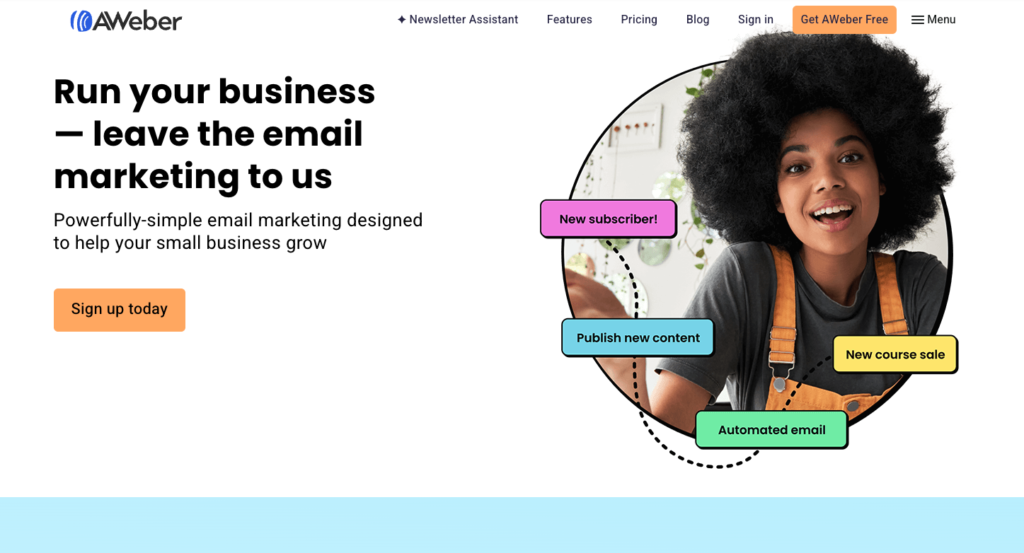
Day to day, the app stays out of your way. You spend most of your time inside the email builder, subscriber list, and simple automations, not hunting through deep menus. If you run a side hustle and just want to look professional quickly, this “do the work, then hit send” feel is the main draw.
Use this link to get 4 months free with an annual plan.
Email Builder, Templates, and Brand Setup
AWeber’s drag-and-drop email builder is built for speed. You start with a ready-made template, swap in your copy and images, and you’re already close to something you can send. For creators and small shops, that matters because you don’t want to spend two nights adjusting columns when you should be writing the offer.
Templates cover the common stuff (newsletters, promos, announcements). Once you find a layout you like, you can reuse it, so future sends feel more like filling in a form than designing from scratch. AWeber also makes it easy to save sections you’ll repeat, like a featured product block, a testimonial strip, or a “new this week” header. That saves time if you send weekly.
Brand setup is basic but useful. You can set default colors and fonts so new emails keep the same look without you redoing styles every time. You also get mobile preview, which is where many side hustle emails win or lose. A message that looks great on desktop can feel cramped on a phone, so it’s helpful to check quickly before sending.
If you prefer a simpler style, AWeber supports a more plain-text look too. That’s ideal for personal updates, coaching emails, or “quick note” promos where heavy design can feel salesy.
Still, the builder has a few common pain points:
- Spacing quirks: Some blocks can look slightly off, especially after adding or removing elements quickly.
- Font consistency: Mixing template sections sometimes brings small font size changes you have to correct.
- Image handling: Large images may need resizing first, otherwise they can push the layout around.
If you want to ship good-looking emails fast, and you don’t want to touch code, this is where AWeber feels strongest.
Beginners who want speed and predictability will be happiest here. If you love pixel-perfect design control, you may feel boxed in at times.
Automations and Funnels
AWeber automations are built for the sequences most side hustles need. You can send a welcome series, tag people based on actions, and trigger follow-ups from link clicks or signups. In practice, it means you can stop manually sending “thanks for joining” emails and let the system handle the first few touches for you.
The building blocks are simple:
- Triggers: Someone joins a list, fills out a form, or gets a tag.
- Actions: Send an email, wait a set time, apply a tag, or stop a sequence.
- Behavior signals: Clicked a link, opened an email, or took a tracked step.
This setup is ideal for straightforward funnels, such as a lead magnet, a short education series, then a promo. However, if you want complex branching with lots of paths, goals, and deep behavior rules, AWeber can feel limited compared to more creator-first automation tools. You can still segment with tags and build separate paths, but it’s not the kind of visual logic playground where you map a dozen “if this, then that” scenarios in one place.
Here’s a concrete example that works well for a lead magnet to a low-cost digital product:
- Signup: A subscriber opts in through a landing page or embedded form to get your free checklist.
- Email 1 (immediate): Deliver the checklist, then ask one simple question (so replies train your list and shape future offers).
- Wait 1 day
- Email 2: Quick win lesson tied to the checklist, then a link to a related blog post or video.
- Link click tag: If they click the “see the tutorial” link, apply a tag like
interested-tutorial. - Wait 2 days
- Email 3: Offer your $9 to $29 template or mini-course, with a short story and one clear call to action.
- Follow-up: If no click, send a softer reminder with FAQs, then stop.
Once this is live, your day-to-day work becomes writing better emails and watching results. Reporting stays simple (opens, clicks, and subscriber activity), and that’s usually enough to tell if your subject lines and offers are landing. Integrations also help here, since you can connect AWeber to common site builders, checkout tools, and lead capture forms without a custom setup.
How AWeber Performs Where it Counts
AWeber gets judged on three things that actually move the needle for side hustles: do your emails reach inboxes, can you grow a list without duct-taping extra tools together, and can you tell what worked in a quick check-in.
Deliverability is never just a “platform thing”. Your domain reputation, your content, and your list quality matter a lot. Still, AWeber gives you the basics that support clean sending, like confirmed opt-in (double opt-in) and the ability to manage subscribers by tags and activity. That’s the difference between building a list that buys and collecting a pile of dead addresses that hurts future sends.
On growth and reporting, the best part is speed. You can set up a form, connect a freebie, and watch early results without feeling lost in dashboards.
Signup Forms, Landing Pages, and Lead Magnets
AWeber covers the main ways side hustles collect emails, without forcing you into a separate form plugin on day one. You can create signup forms for your site and publish them in a few formats depending on how you want to show them.
Most users will rotate between these options:
- Embedded forms: Great for blog sidebars, in-post opt-ins, and footer signup boxes. They feel natural and don’t interrupt readers.
- Pop-up style forms: Better when you need attention fast, like a coupon offer or a “free checklist” prompt. Use them sparingly so they don’t annoy mobile visitors.
Customization is practical, not fancy. You can adjust the basics (copy, colors, fields, and layout) so the form matches your brand. Keep fields minimal; asking for just email (and maybe first name) usually boosts conversions.
Landing pages are included, which is helpful when you don’t have a full site flow yet. You can build a simple page that focuses on one promise, like “Get the 7-day email course” or “Download the Etsy listing checklist”. For many side hustles, that’s enough to start collecting subscribers today instead of “someday”.
Lead magnets also need delivery, not just a signup box. AWeber can handle this through your automation setup, for example:
- Create a form or landing page tied to your list.
- Set a welcome email that delivers the freebie link (or instructions).
- Add a short follow-up sequence so new subscribers don’t go cold.
If you sell or collect leads across platforms, integrations matter. AWeber connects with common tools, and you can also rely on connector-style automation (Zapier-style workflows) to pass new customers or leads into your list. WordPress and Shopify are common fits for site and store owners, and Etsy sellers often connect through third-party connectors or automation tools when a direct integration isn’t available.
If your opt-in page needs advanced design controls, deep A/B testing, or a lot of sections, you may still want a dedicated landing page tool. For simple “freebie in, welcome series out”, AWeber’s built-in pages usually do the job.
One deliverability habit that pays off fast is list hygiene. Turn on confirmed opt-in if you see junk signups, and regularly remove or segment cold subscribers. A smaller engaged list often outperforms a big sleepy one.
Reporting and Testing
AWeber’s reporting is built for quick decisions. You’re not hunting through endless charts, you’re checking a few core numbers that tell you if your emails are doing their job.
Start with the top-level dashboard view, then drill into the report for a specific broadcast or automation. In practice, you’ll spend most of your time looking at:
- Opens: A rough read on subject line and sender trust (privacy changes can make this imperfect, so don’t obsess).
- Clicks: The clearest signal that your content and offer landed.
- Unsubscribes: A useful “message match” check. Spikes mean your topic or frequency missed expectations.
- Bounces: A list quality signal. Too many bounces can hurt inbox placement over time.
- Subscriber growth: New signups versus losses, so you know if the list is compounding or leaking.
The fastest win comes from simple testing. If your workflow supports it, test subject lines first because it’s the highest-impact change you can make in minutes. If send-time testing is available in your setup, it’s also worth trying, especially if your audience spans time zones or buys at night and on weekends.
Here’s a mini routine you can run every week, even with a busy schedule:
- Metric to watch: Click rate on your last broadcast or top automation email. Clicks tie directly to traffic and sales.
- One simple change to try next: Rewrite the email to use one main call to action (one primary link, repeated twice), then compare clicks.
When clicks lag, don’t immediately rewrite everything. First, tighten the promise. Match the subject line to the first sentence, then make the link stand out with clear wording like “Get the template” instead of “Click here”.
Finally, keep deliverability in mind while you optimize. If you’re emailing people who never open or click, reports may look fine short term, but inbox placement can slide later. AWeber makes it realistic to keep things clean: segment inactive subscribers, re-engage them with one simple email, then stop mailing the ones who stay silent. That one habit protects your future sends.
Pricing, Support, and the Fine Print
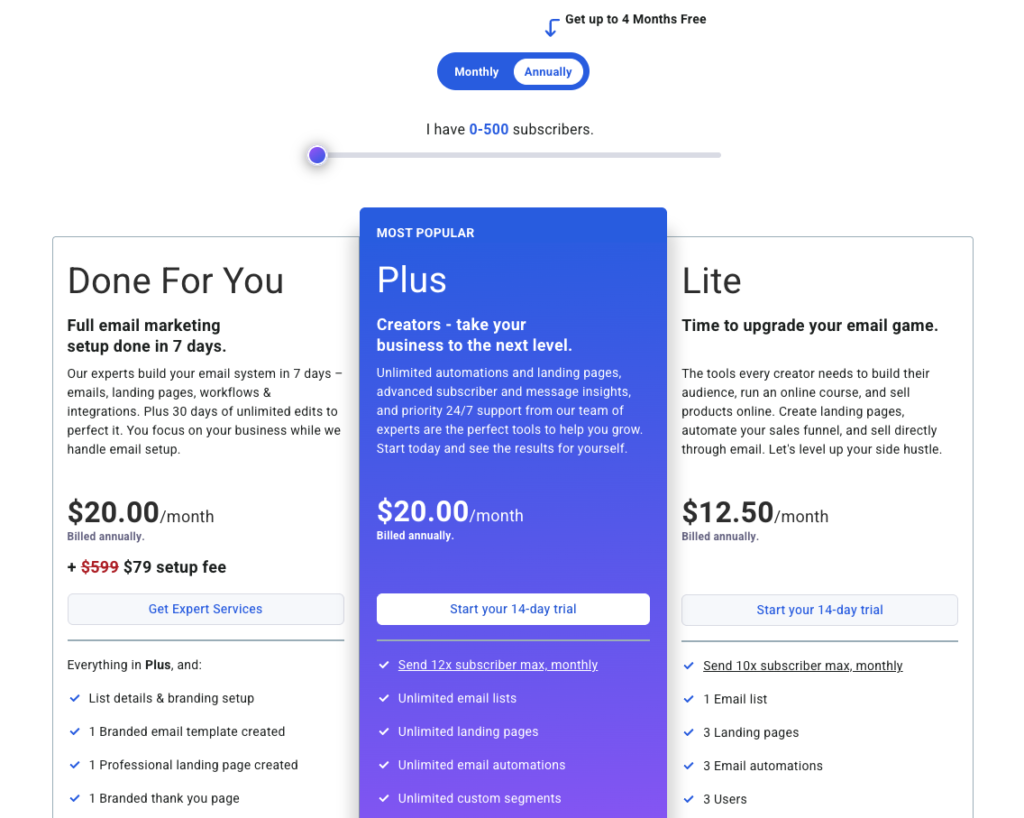
AWeber’s pricing is mostly about two things: your subscriber count and which plan level you choose. As your list grows, the price usually steps up in tiers, so the “cheap at 500 subscribers” plan can feel different once you’re at a few thousand. That’s normal for email platforms, but it’s worth planning for if your side hustle is gaining traction.
Most people start on the free plan to test the workflow, then move to a paid plan once they want more polish and control. In plain terms, the common differences look like this:
- Free plan: great for learning and sending basic newsletters, but it often includes AWeber branding and can come with limits on advanced automation or certain premium features.
- Paid plan: removes branding, usually unlocks more automation options, and tends to include deeper tools and settings that matter once you’re selling consistently.
Billing also matters. AWeber typically offers monthly and annual billing. Monthly keeps things flexible, while annual usually lowers the effective monthly cost. If you’re not sure you’ll stick with email marketing yet, monthly can buy peace of mind.
Before you commit, read the “small stuff” like cancellation timing, list limits, and what happens to scheduled emails if you downgrade. It’s also smart to confirm you can export your subscribers, tags, and reports easily, because switching tools later is mostly a data-move project, not a tech nightmare.
Budget for where you’re going, not where you are. Email pricing rises as your list grows, so pick a plan you can live with at the next milestone.
On support, AWeber has a long-standing reputation for being beginner-friendly. Expect a solid help center, setup guides, and responsive support (often via live chat and email, with hours depending on your region). Onboarding resources like tutorials and webinars help when you’re setting up your first forms and automations.
Best-fit Use Cases of AWeber
AWeber fits best when you want email marketing to feel like a reliable pickup truck. It gets you from opt-in to send to sale without a lot of tuning.
Best for:
- Beginners who want a clean setup and simple menus.
- Simple newsletters (weekly updates, curated links, personal notes).
- Basic funnels like a lead magnet, a welcome series, then a short promo.
- Small shops that need announcements, coupons, and product highlights without complex logic.
Not best for:
- Advanced creators who want deep segmentation tied to lots of behaviors.
- Marketers who build heavy automation with many branches, goals, and edge cases.
- Teams running complex launches with layered targeting, multiple offers, and tight timing.
A few quick side hustle scenarios make the fit clear:
- Printables seller (Etsy or Shopify): AWeber works well for “free checklist opt-in” plus a 5-email sequence that points to your best bundles. As your list grows, pricing will rise by tier, so plan for that climb if your shop scales fast.
- 1:1 coaching: You can run a simple nurture newsletter, tag people who click “work with me”, and send a short follow-up series. If you later want advanced behavior scoring and multi-path automation, you may outgrow it.
- Affiliate newsletter: AWeber handles consistent broadcasts and basic click-based tagging. Still, if your income depends on very granular segments (by topic, click history, and purchase intent), you’ll likely want a platform built for deeper targeting.
If you’re the type who switches tools often, keep the exit plan in mind. Exporting subscribers is usually quick, but rebuilding forms, automations, and templates can take a few hours to a few days, depending on how much you’ve built.
AWeber vs Constant Contact vs ConvertKit
All three tools send newsletters and run basic automation, but they’re built for different types of businesses. Think of it like choosing a vehicle. AWeber is the dependable starter car for side hustles, Constant Contact feels like the office-friendly option for local businesses, and ConvertKit is tuned for creators who sell digital products.
Here’s the quick side-by-side, using the factors that matter when you’re starting and you need results fast.
| Category | AWeber | Constant Contact | ConvertKit |
|---|---|---|---|
| Best for | Side hustles, simple funnels, newsletters | Local businesses, community orgs, event-style marketing | Creators, lead magnets, digital products |
| Ease of use | Simple workflow, easy to get sending | Very guided, beginner-friendly | Clean and focused, best if you like tagging |
| Automation depth | Solid basics (welcome series, tags, follow-ups) | Lighter automation, more campaign-style | Strong creator automation and segmentation |
| Templates and design | Plenty of templates, quick to look polished | Strong templates, very “business newsletter” friendly | Simpler look, more text-first by default |
| List management | Tags + segments, practical for most | List-centric, straightforward contact tools | Tag-first, great for behavior-based segments |
| Typical pricing style | Tiered by subscribers | Tiered by contacts and plan level | Tiered by subscribers, creator features push upgrades |
The main trade-off: ConvertKit usually wins on creator-friendly automation and segmentation, Constant Contact often wins on traditional email design and local business workflows, and AWeber sits in the middle with a solid mix of ease and core features.
If you’re sending weekly emails and building one simple funnel, you’ll feel the differences less. If you’re segmenting hard, the gaps show fast.
Which One to Choose if You’re Just Starting Out
Start with your business type, because that decides what “easy” really means.
- Local service business (dentist, salon, realtor, gym, restaurant): Pick Constant Contact if you need polished newsletters, simple promos, and an interface that feels like office software. It’s a comfortable fit when email supports referrals, events, and regular updates more than complex funnels.
- Creator with a lead magnet and digital products (coach, YouTuber, blogger, course seller): Pick ConvertKit if your plan includes a freebie, a nurture sequence, and selling products through targeted segments. It’s built for tagging people by interest and sending different emails based on what they click.
- General small online shop or side hustle (Shopify starter, Etsy-style offers, affiliate newsletter, basic content site): Pick AWeber if you want a straightforward setup that handles forms, newsletters, and a simple sales sequence without feeling intense. It’s a strong choice when you want to move fast and keep things readable.
A practical way to decide is to plan for the next 90 days, not your dream setup. Ask yourself what you’ll actually ship soon:
- If you’ll send 1 newsletter per week, choose the tool you’ll open without dread (often AWeber or Constant Contact).
- If you’ll build one lead magnet plus a 5 to 10-email sequence, ConvertKit or AWeber makes that easier.
- If you won’t segment much yet, don’t pay for complexity you won’t use.
Simple decision guide: pick AWeber if you want fast setup, solid basics, and simple funnels; pick Constant Contact if you run a local business and want traditional newsletters and promos; pick ConvertKit if you’re a creator and you need stronger tagging and automation for digital products.
Conclusion
AWeber shines when you want email marketing that feels simple and dependable, with solid templates, easy forms, and automations that cover the basics. Still, it can feel limiting if you need deep segmentation, complex branching, or pixel-perfect design control. For most side hustles, though, the real win is consistency, you can set up once, then keep sending without getting stuck in settings.
Next, take the free plan for a spin, build one landing page, write a 3-email welcome series, then send one broadcast to your list this week. Finally, keep your list clean (confirmed opt-in, tag engaged readers, and prune cold subscribers), because a smaller active list usually earns more than a bigger quiet one.
No responses yet