Krisp Review
Can this AI meeting assistant save your noisy calls?
Your side hustle is finally starting to click. You have client calls booked, a podcast idea in motion, maybe a coaching offer you are testing on Zoom.
Then your neighbor decides to drill into a wall. A bus roars past. Your kid shouts from the next room. The client squints, leans in, and says, “Sorry, what was that?”
That tiny moment of noise can chip away at trust. It can make a $2,000 coaching package sound like a $20 hobby.
Krisp fixes this problem for you.
This review walks through how Krisp works, where you can use it, the features that matter for side hustlers and online founders, its pricing, and who should actually pay for it. The goal is simple: help you decide if this tool can help you sound more professional and win more clients, without wasting your budget.
Disclosure: our content is reader-supported, which means we may earn commissions from links at no cost to you.
What is Krisp and How Does it Work?
Krisp is a desktop app and AI meeting assistant built to clean up audio on calls. It uses machine learning to remove background noise, reduce echo, and in some cases capture your meetings and turn them into notes.
In plain terms, Krisp sits in the middle between your microphone and your call.
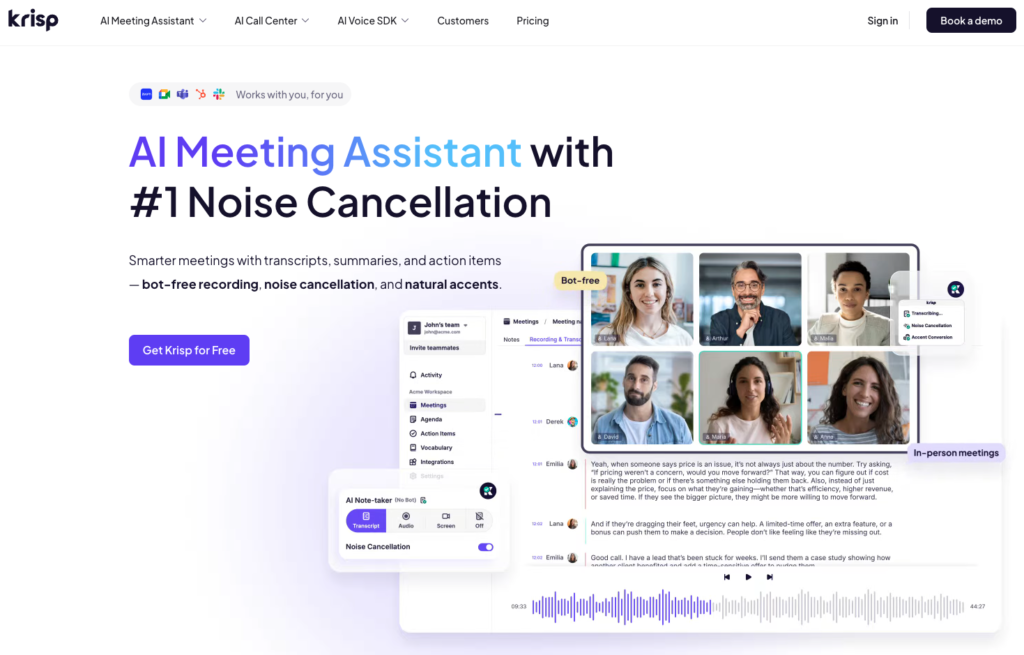
You pick “Krisp Microphone” and “Krisp Speaker” inside Zoom, Google Meet, or your call app. Krisp listens to the raw audio from your mic, filters out sounds that are not your voice, then sends the cleaner audio into the meeting. The same thing can happen on the sound coming back to you from other people.
So when a truck honks outside your window, Krisp tries to erase that honk before your client ever hears it. When your client’s dog is barking on their end, Krisp can filter that too, so you hear their voice more clearly.
Krisp as an AI noise-canceling and meeting assistant
At its core, Krisp is an AI noise-canceling tool. It is trained on a large mix of human voices and common background sounds. That training helps it tell the difference between “speech” and “everything else”.
Krisp works in three main ways:
- Noise removal on your microphone
It listens to your mic, removes keyboard clicks, fan noise, street sounds, kids in the hall, and sends a cleaner signal to your call app. - Noise removal on incoming audio
It can also sit on the output side. This means it can clean what you hear from others, so you are not straining through their bad mic or loud room. - Echo cancellation and meeting assistant features
Krisp can reduce room echo (that hollow sound from bare walls) and, on certain plans, record your meetings and create AI notes or summaries. That part is more like a lightweight meeting assistant that helps you remember decisions and action items.
The result is simple. You sound like you took audio seriously, even if your “studio” is your bed, a laptop, and a cheap USB mic.
Where you can use Krisp (apps, devices, and platforms)
Krisp works on Windows and macOS, so it fits most laptops used by side hustlers and remote workers. At the time of writing, the desktop app is the main way people use it.
Since it acts as a virtual audio device, it works with most call and recording tools, including:
- Zoom coaching calls
- Google Meet sales calls or discovery calls
- Microsoft Teams or Slack standups
- Discord communities and mastermind chats
- Podcast interviews on tools like Riverside or Zencastr
- Quick Loom or Screen Studio recordings with voiceover
If your app lets you choose a microphone and speaker, there is a good chance Krisp will slot right in.
So you do not have to rebuild your workflow. You keep your same call tools, and Krisp sits quietly in the background, cleaning the sound.
Krisp Features That Matter
There are plenty of audio tools out there, but side hustlers do not need studio toys. You need features that protect your income and your reputation.
Here is how Krisp helps with that.
AI noise removal so clients hear you clearly
Think about the soundscape around you on a normal day. Maybe you have:
- A barking dog that explodes right when you quote your price
- A shared apartment with roommates walking past
- A fan or AC unit humming beside your desk
- Heavy typing as you take notes while a client talks
Krisp listens to all of that and tries to remove anything that does not sound like a human voice.
On your side, this means your client hears your words, not your environment. On their side, it means you do not feel worn out from fighting against noise, so you can listen better and respond faster.
Clean audio does more than just “sound nice”. It helps you come across as calm and prepared. It makes your $150 strategy session feel like it belongs in the same league as bigger, more polished brands.
If you pitch clients on Upwork, Fiverr, or LinkedIn, those first calls are often your only live shot. Clear audio can be the small edge that keeps you from sounding like a hobbyist.
Echo cancellation for echoey rooms and bare walls
Many new founders work from tiny apartments or spare bedrooms with hard walls and bare floors. That kind of space bounces sound around, which creates echo.
You can hear it on recordings as that hollow, “bathroom” tone.
Professional studios fix this with foam panels, rugs, and fancy room treatment. Most side hustlers are not ready to invest in that.
Krisp’s echo cancellation tries to tame that bounce. It hears the reverb trail on your voice and dampens it in real time. The effect is not magic studio audio, but it often pulls you closer to that “quiet office” feel without buying extra gear.
This matters if you:
- Record podcast intros from a small room
- Run coaching calls from a mostly empty home office
- Take sales calls from echoey co-working phone booths
Echo is the kind of problem people can not always name, but they feel it. Reducing it nudges you a step closer to “serious business owner” in your listener’s mind.
Recording calls and getting AI meeting notes
On some Krisp plans, you can record your meetings and get AI-powered notes, summaries, and action items.
For a side hustler, this can replace frantic typing while you listen. You can focus on the client, ask better questions, and trust that you can revisit the recording later.
Common uses:
- Client discovery calls
Rewatch the call and highlight exact phrases your client used. That helps you write sharper proposals and sales pages. - Coaching sessions
Send a call recap with key wins and next steps. That feels polished and helps clients stay on track. - Team or contractor check-ins
Share notes with your VA, editor, or designer, so everyone sees the same decisions.
Features change over time, and the exact limits on recording and notes depend on your plan. The main idea stays the same. You click record, run your call as normal, and later you have a searchable record instead of scattered Notion bullets.
Audio quality for content creators, podcasters, and course builders
If you create content, audio quality can quietly make or break your numbers.
Viewers will forgive a slightly grainy webcam. They click away fast from rough sound. Hiss, echo, or loud background noises make people feel tired, even if they can not say why.
Krisp helps with:
- Live streams, where you can not edit noise out later
- Guest interviews with people who sit in noisy spaces
- Course lessons recorded on a laptop mic at odd hours
- Quick screen-share videos for clients or students
You still want a decent microphone at some point, but Krisp can stretch the life of your existing setup. That means you can ship content, get feedback, and grow faster before you pour money into gear.
For many creators, this is the hidden value. You get to publish sooner with “good enough” audio that still sounds clear and intentional.
Krisp Pricing, Free Plan, and Best Value for Side Hustlers
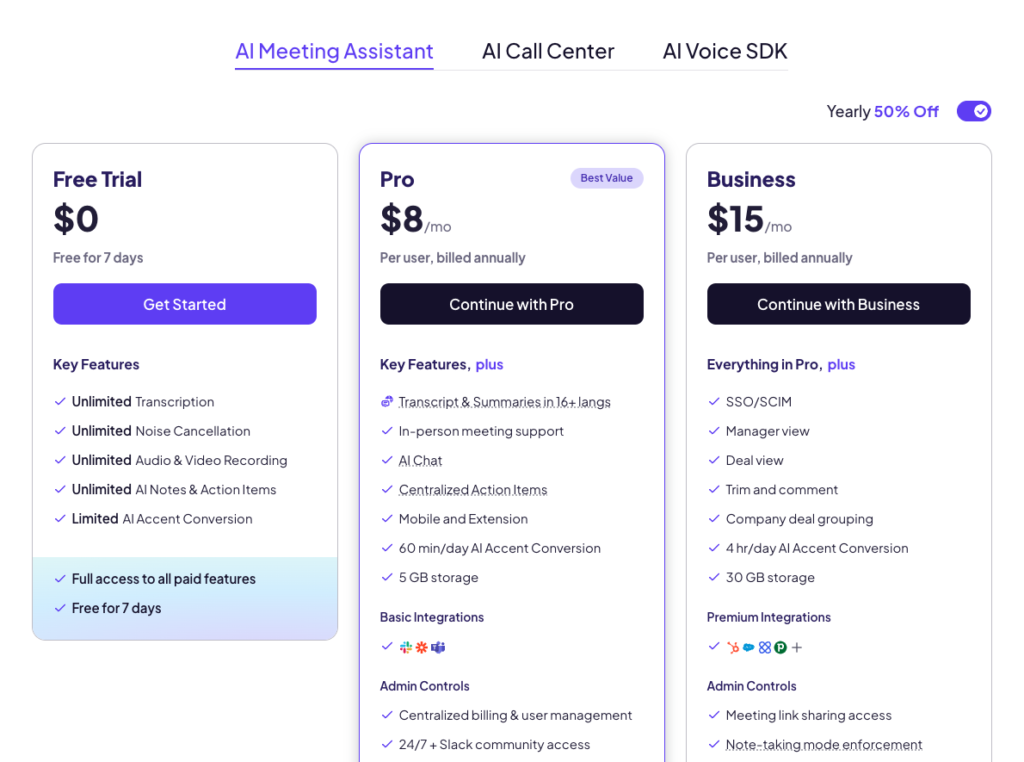
Krisp has a simple model: a free plan, then paid plans for individuals and teams. Prices can shift, so always check the current numbers on their site, but the structure is steady.
What matters for a side hustler is not every line-item feature. It is whether the free tier covers your use, and when paying each month is smarter than risking another noisy call.
Limited free plan
The free plan usually gives you:
- Access to noise removal
- Some kind of usage cap, like a set number of noise-canceled minutes per day or month
- Limited or no access to advanced meeting assistant tools
You can think of it as a “light” safety net. It is best for:
- New freelancers who only have a few client calls per week
- Sellers who hop on the odd Zoom to close a deal
- Early-stage creators who are still testing formats and gear
- Anyone who wants to try Krisp without pulling out a card
If you are still in the “testing my idea at night” phase, the free plan is often enough. You can use Krisp on your most important calls and see how much cleaner they feel.
Paid plans and when an upgrade makes sense
Paid plans unlock more of what makes Krisp feel like a stable part of your setup.
Common perks of paid tiers include:
- Unlimited or much higher noise-canceled minutes
- Better control over echo and audio quality
- Access to recording, transcripts, and AI meeting notes
- Admin features for small teams, if you grow into that
An upgrade usually makes sense if:
- You have daily client calls and keep hitting the free limits
- You run a podcast or a content channel with guests
- You coach or consult as a main income stream
- You lead a small remote team and want everyone to sound sharp
In most markets, a month of Krisp costs about the same as a few coffees or one cheap lunch. If one saved client, one upsell, or one smoother discovery call pays for that, the math is pretty gentle.
Is Krisp worth the money compared to other tools?
You could try to fix your audio in three main ways:
- Hardware
Buy a better microphone, a boom arm, sound panels, and maybe a new headset. Great long term, but the upfront cost adds up. - Built-in noise reduction
Zoom, Teams, and others have basic noise suppression. It helps, but it is not always strong enough for heavy background sounds or echo. - Dedicated software like Krisp
This gives you stronger noise removal on almost any app, plus extras like AI notes.
For many side hustlers, the sweet spot is a simple USB mic plus Krisp. You do not need studio treatment, and you go beyond what built-in tools usually do.
If you already work in a treated studio with high-end gear, you might not need Krisp at all. But if you are building your business from a noisy home or shared space, Krisp can feel like a very cheap upgrade to your “brand voice”.
Pros, Cons, and Who Krisp Is Best For
Not every tool fits every side hustle. Here is a clear look at where Krisp shines and where it falls short.
For remote workers and side hustlers
The biggest strength is how simple it feels.
You install the app, log in, pick Krisp as your mic in Zoom or your call tool, and that is it. You do not need audio knowledge or a deep tech setup.
For remote workers and side hustlers, this brings real perks:
- You get a fast boost in call quality without buying gear.
- Clients hear your ideas, not your environment.
- It works across many apps, so you do not have to change your stack.
- It runs quietly in the background and, on most modern laptops, uses modest system resources.
This is helpful if you are:
- A freelance designer pitching a brand project from a studio flat
- A coach running back-to-back sessions from a spare room
- A Shopify store owner taking support calls during your lunch break
- A podcaster recording late at night while family sleeps
Krisp supports the story you want clients to believe: that you take their time and attention seriously.
Krisp drawbacks and who might not need it
Krisp is not perfect, and it is better to know that before you install it.
Some common downsides:
- It is another app to install and manage on your computer.
- Paid plans stack up over time, which can pinch tight budgets.
- It can not fix a very bad internet connection or huge audio dropouts.
- The free plan limits can feel tight if you have many calls in a row.
Also, if you already have:
- A treated room with acoustic panels
- A solid dynamic microphone placed close to your mouth
- Careful mic technique and post-production tools
Then the gain from Krisp might be small. Many podcasters and streamers at that level fix issues in their audio editor instead.
Krisp is best seen as a practical patch for real-world noise, not a cure for every audio problem.
Who should try Krisp first
Certain groups tend to get the most value right away.
- New freelancers on Upwork or Fiverr
Your voice is part of your sales pitch. Clean calls help you stand out from a crowded list of profiles. - Online coaches and consultants
Clients pay for clarity and presence. Audio that feels calm and clean supports both. - Sales reps or founders working from home
Discovery calls, demos, and follow-ups feel more polished when your environment disappears. - Podcasters and YouTubers with noisy homes
You can ship episodes without waiting until the house is silent.
A simple way to test: install Krisp, keep the free plan, and run it for a week of calls. Record a short “before and after” test of yourself speaking with and without Krisp. Play them back and ask, “Which version sounds like someone I would trust with my money?”
Your ears will tell you more than any spec sheet.
Conclusion
Noise will not close deals for you, but it can quietly lose them. Your side hustle depends on how you show up, and sound is a big part of that.
Krisp will not run your business or write your pitch. What it can do is make you sound sharper, calmer, and more reliable on every call. For anyone who works in a noisy space, talks to clients often, or records content, that is a simple, practical edge.
If you rarely use your mic or already sit in a treated studio with great gear, Krisp is optional. For most side hustlers juggling family, roommates, and city noise, it can feel like a cheap upgrade to your “audio brand”.
Think about how many calls you take each week and how you want future clients to hear you. Then try the free plan, record a quick before-and-after sample, and listen back. If the cleaner version sounds like the professional you are building toward, the paid plan may well pay for itself.
No responses yet